CORS Misconfiguration & Data Exfiltration
Identifying and exploiting CORS misconfigurations for unauthorized data access — building proof-of-concept exploits and understanding the full security implications.
Understanding CORS
Cross-Origin Resource Sharing (CORS) is a mechanism that allows browsers to make requests to domains other than the one serving the current page. By default, browsers enforce the same-origin policy, blocking cross-domain requests for security. CORS provides a way to selectively bypass this restriction.
When implemented correctly, CORS enables legitimate cross-domain communication. When misconfigured, it becomes an information disclosure vulnerability.
Discovery Through Reconnaissance
During directory enumeration, I identified a wp-json endpoint that caught
my attention. WordPress REST API endpoints are common, but their CORS configuration
often reveals security issues.
Testing for Misconfiguration
Testing CORS is straightforward — add an Origin header to your request and
inspect the server's response headers.
- Intercept the request in Burp Suite
- Add header:
Origin: https://attacker.com - Send the request and examine the response headers
A properly configured server will either reject the request or only allow specific, trusted origins. A misconfigured server will reflect the attacker-controlled origin back in the response.
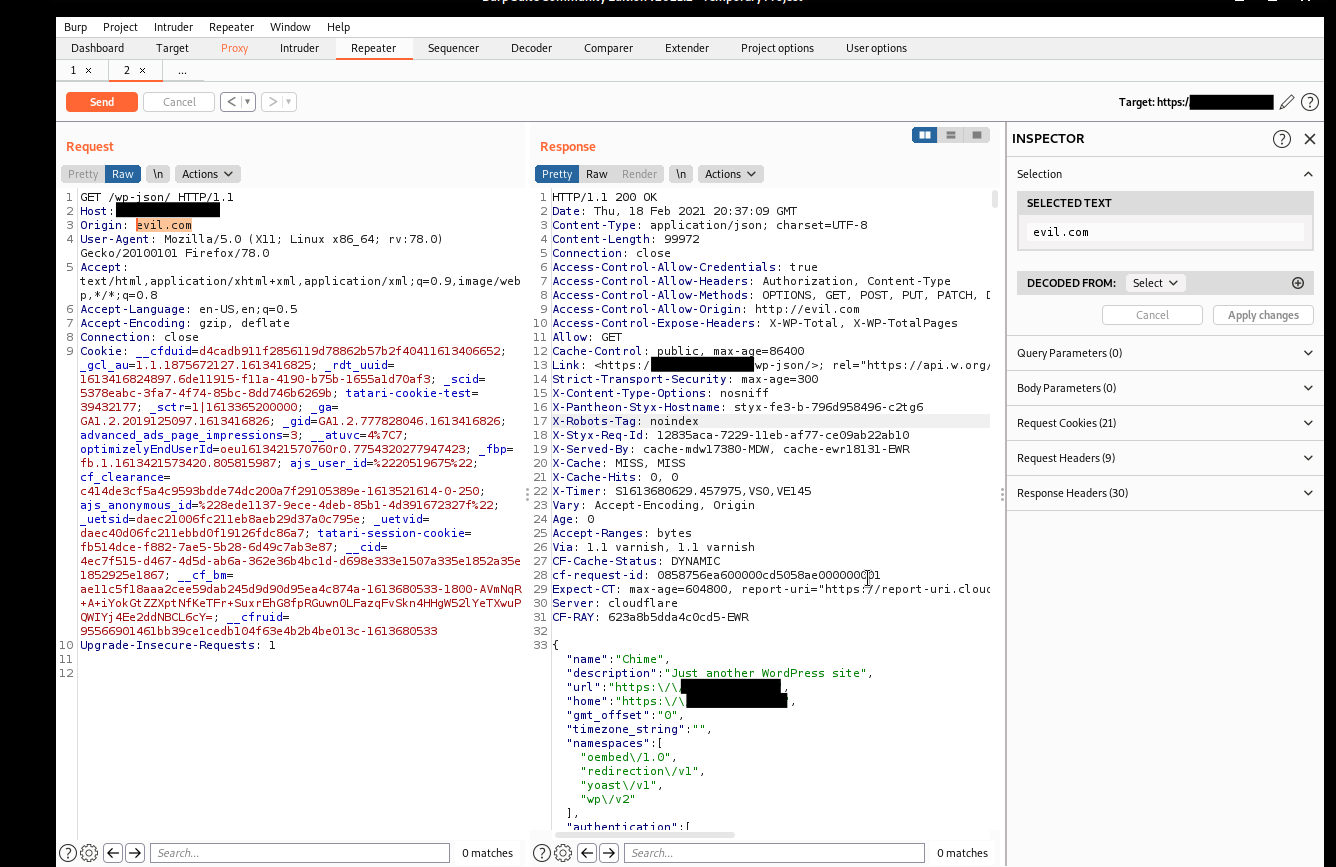
The key indicator is in the response headers:
When the server reflects the attacker's origin and includes
Access-Control-Allow-Credentials: true, authenticated requests become
possible from arbitrary origins. This breaks the security model browsers rely on
to protect user data.
Exploitation
With CORS misconfigured, an attacker can craft a malicious page that makes authenticated requests to the vulnerable endpoint. When a victim visits the attacker's page while logged into the target site, their browser automatically includes authentication cookies.
Proof-of-concept exploit:
This page makes an authenticated request to the vulnerable endpoint, displays the response, and silently sends it to an attacker-controlled server. The victim sees a seemingly normal page. The attacker receives their sensitive data.
Impact
- Authentication token theft from API responses
- Personal information disclosure from user profile endpoints
- Cross-site request forgery with full response reading
- Session hijacking through reflected authentication data
Proper Configuration
CORS should be configured with explicit allowlists of trusted origins. Never use:
- Wildcard origins with credentials enabled (
*+allow-credentials) - Reflection of arbitrary
Originheaders nullorigin acceptance- Overly permissive method and header allowances
The same-origin policy exists for a reason. CORS provides controlled exceptions to that policy. Misconfiguring it defeats the security model browsers rely on to protect users.